Short answer: to create a Shopify store in Pakistan, sign up on Shopify with your email, set your store currency to PKR, choose a theme, add your products, turn on cash on delivery plus a local payment gateway, set shipping rates for your courier, connect a domain, publish your policies and remove the store password. A simple Shopify store takes a few days. Shopify itself is billed in US dollars to a card that allows international payments.
We build Shopify stores for Pakistani brands such as sheem.pk, and our Shopify development services team follows the same nine steps on every project. This guide shows how to make a Shopify store step by step, with real screenshots of the Shopify admin, so you can do it yourself or know exactly what to expect if you hire someone.
If you are still deciding whether Shopify works here at all, read is Shopify available in Pakistan first. Short version: it does, with a few local workarounds this guide covers.
Chapter 01
What You Need to Create a Shopify Store in Pakistan
Have these ready before you sign up. It saves you from stopping halfway through setup.
| You need | Why | Tip |
|---|---|---|
| An email address and mobile number | Your Shopify login and store contact details | Use a business email you will keep |
| A debit or credit card with international payments enabled | Shopify bills its plan in US dollars | Turn on online and international transactions in your banking app first |
| A store name | It becomes your free yourname.myshopify.com address | Check the matching .com or .pk domain is free |
| Product photos, prices in PKR and descriptions | Your first products | Start with 10–20 products, not your whole catalogue |
| CNIC, NTN and a business bank account | Needed later for a payment gateway | Not needed on day one; COD works without them |
| A courier account | To book and track deliveries | Most stores start with one courier and add a second later |
You don’t need a company, an office or a developer to create a Shopify store. Many of the stores we look after started as a home business selling on Instagram, then moved to a Shopify store once orders grew.
Stuck on a name? Shopify store name ideas work best when they are short, easy to spell over the phone and free as a domain and an Instagram handle. Say it out loud to a friend; if they can’t type it from hearing it once, pick another.
Chapter 02
Step 1: Sign Up and Start the Free Trial
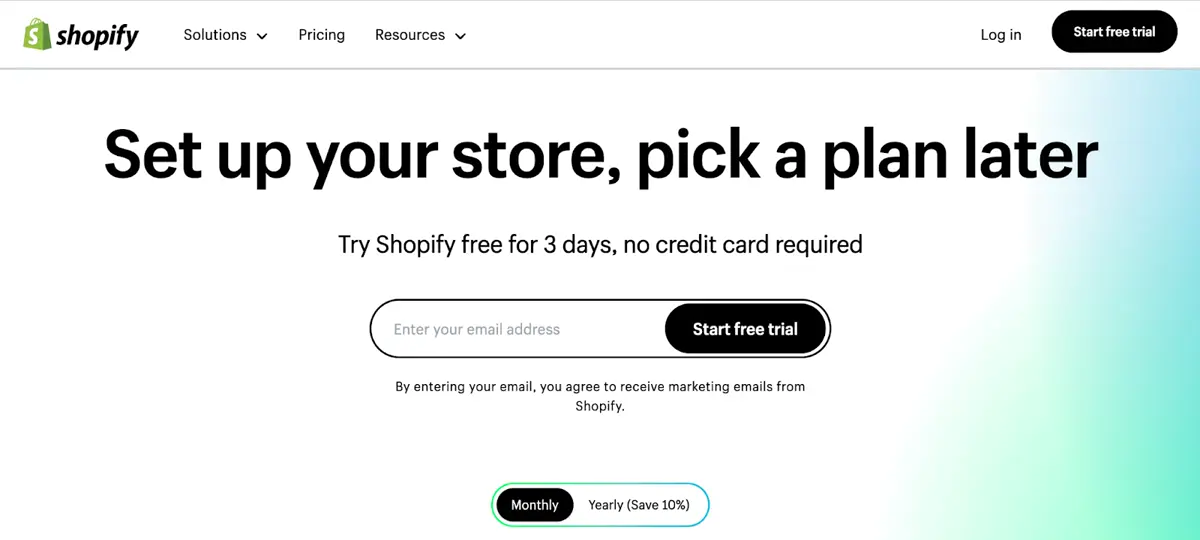
Go to Shopify’s Pakistan pricing page and click Start for free. Shopify asks a few questions (what you sell, whether you already sell somewhere), then creates your store. When we checked in October 2026, the Pakistan page offered three days free, then US$1 a month for the first three months on a starter plan. Offers change, so check the page on the day you sign up.
You choose a plan when the Shopify free trial ends. These are the Shopify plans listed for Pakistan, billed yearly:
| Shopify plan | Price (billed yearly) | Who it suits |
|---|---|---|
| Basic | US$22/month (US$25 paid monthly) | New stores and most small brands |
| Grow | US$58/month | Growing teams that need more staff accounts |
| Advanced | US$359/month | High-volume stores selling across regions |
| Plus | From US$2,300/month | Large brands with complex needs |
Almost every Pakistani Shopify store we build starts on Basic. You can move between Shopify plans at any time from Settings → Plan, and nothing on your Shopify store is lost when you do.
Pro tip: if Shopify declines your card, the cause is nearly always your bank, not Shopify. Enable “online” and “international” transactions in your banking app, then try again. Some banks also need you to call and allow USD payments.
Chapter 03
Step 2: Set PKR, Store Details and Checkout
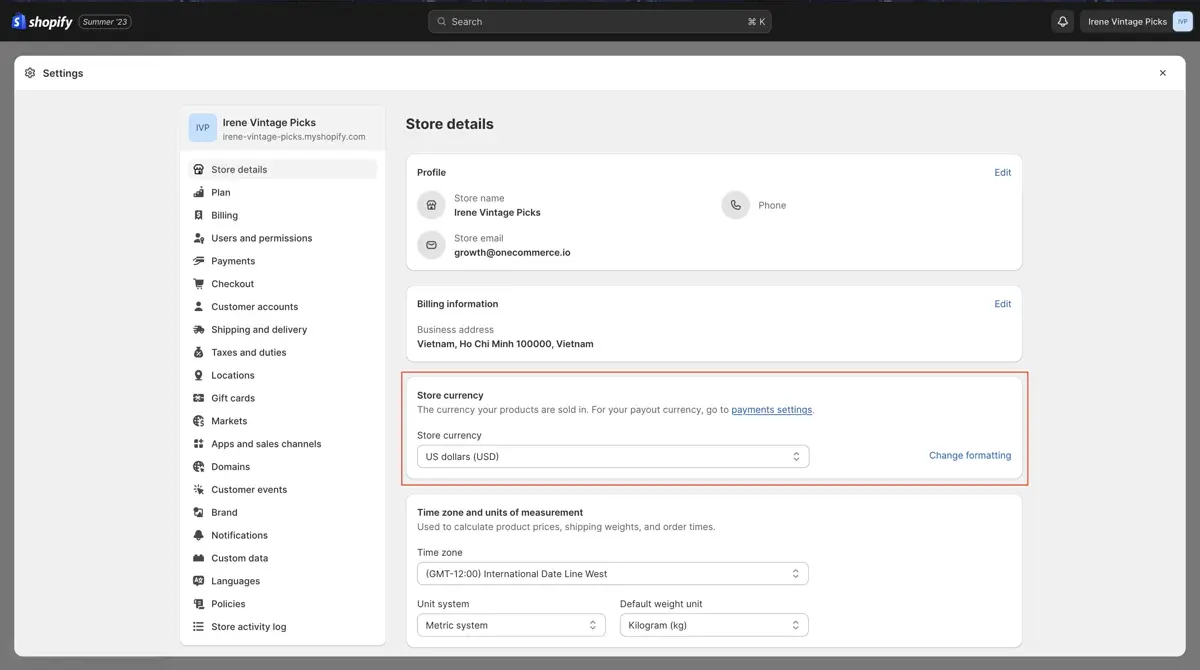
Open Settings → Store details. Add your store name, contact email and phone, and your business address. Then set the store currency to Pakistani rupee (PKR). Do this before you add products or take your first order, because the currency is used for every price and report.
While you are in Settings:
- Time zone: set it to (GMT+05:00) Karachi so order times and reports are correct.
- Checkout: make the phone number required. Couriers need it, and so does your COD confirmation call or WhatsApp.
- Customer accounts: keep them optional. Forcing shoppers to create an account at checkout loses orders.
- Address fields: ask for city and a full address line. “Near the mosque” is not enough for a rider.
Chapter 04
Step 3: Choose a Theme That Suits Your Products
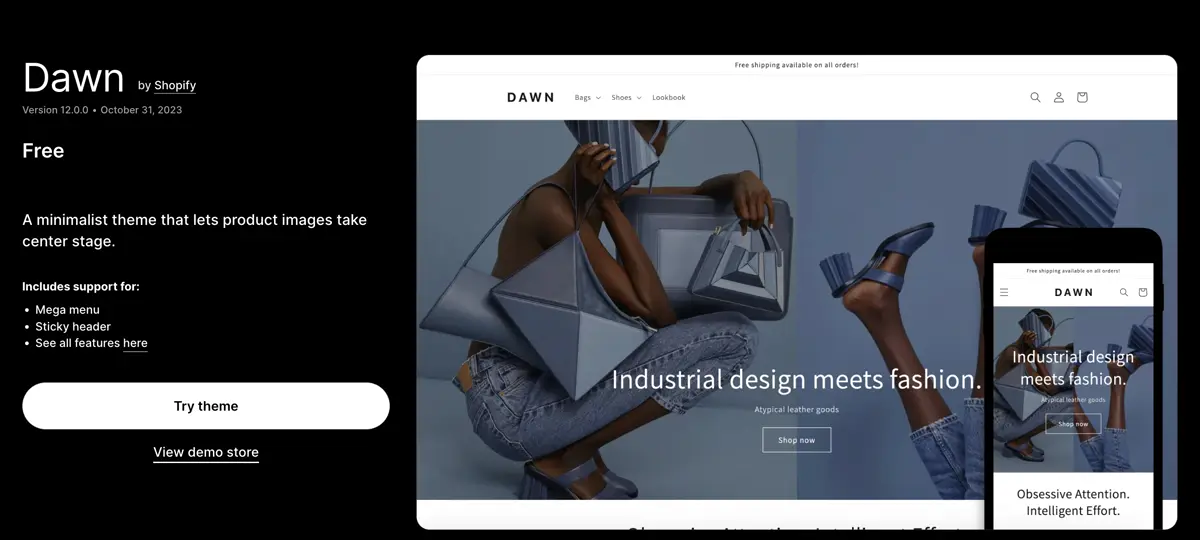
Your theme is the design of your store. Browse the free themes in the Shopify Theme Store and start with a free one. Dawn, Shopify’s own free theme, is clean, fast and a good starting point for clothing, shoes and accessories. Paid themes cost a one-off fee and add features such as mega menus, size charts and lookbooks.
How to choose:
- Look at it on your phone first. Most Pakistani shoppers order on mobile. Open the theme demo on your own phone before you decide.
- Pick a theme made for your catalogue size. A brand with 15 products needs a different layout from a store with 1,500.
- Check speed. Heavy themes with sliders and animations load slowly on mobile data.
Want to see what local brands use? Our guide to Shopify stores in Pakistan shows real stores we built and the themes behind them.
Chapter 05
Step 4: Customise Your Theme Without Code
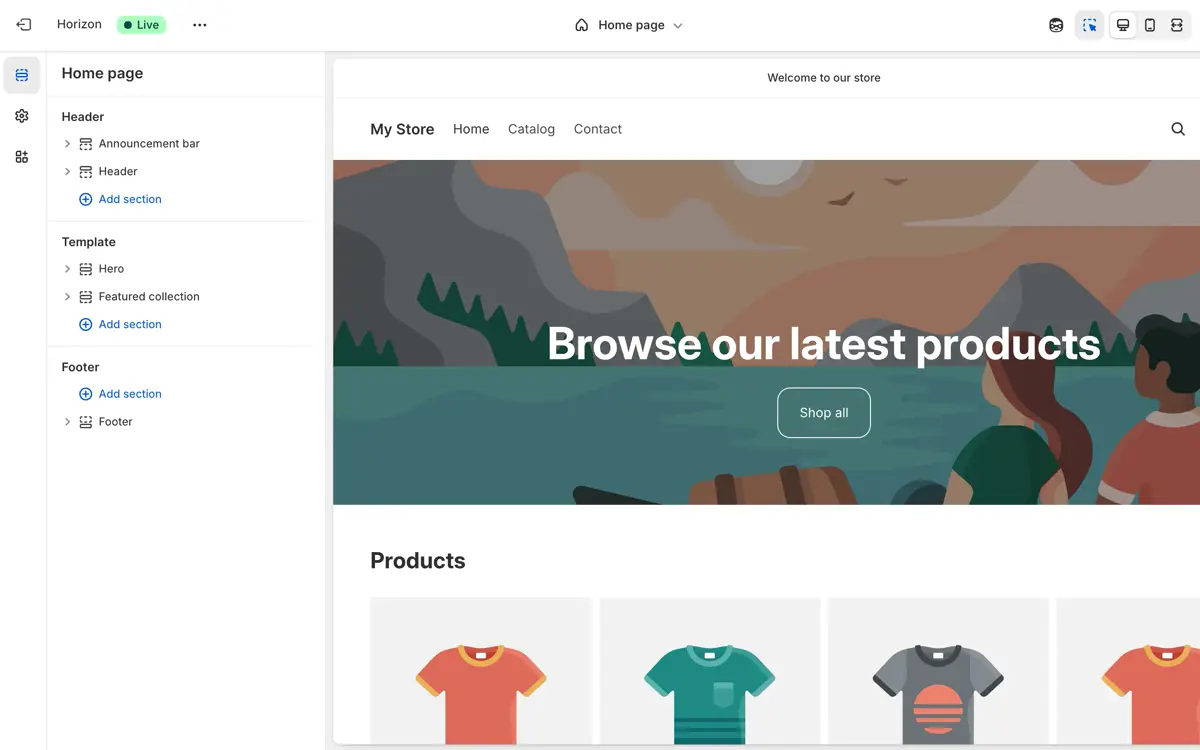
Go to Online Store → Themes → Customize. The theme editor shows your store on the right and its sections on the left. Click a section to change its text, image or colour, drag sections to reorder them, and use Add section for new blocks such as a banner or featured collection.
A homepage that sells, in this order:
- Announcement bar: “Free delivery over PKR 3,000” or “Cash on delivery all over Pakistan”.
- Hero banner with one clear button to your best collection.
- Best sellers or new arrivals.
- Trust strip: COD, delivery time, easy exchange, WhatsApp support.
- Collections by category.
- Reviews or Instagram photos from real customers.
Use the phone icon at the top of the editor to check every section on mobile before you save. Keep image files small (under about 300 KB each) so the store stays fast.
Chapter 06
Step 5: Add Products and Collections
Go to Products → Add product. Fill in the title, a description that answers buyers’ questions (fabric, size, care, what’s included), photos, the price in PKR and the compare-at price if the item is on sale. Under Variants, add sizes and colours so each one has its own stock count.
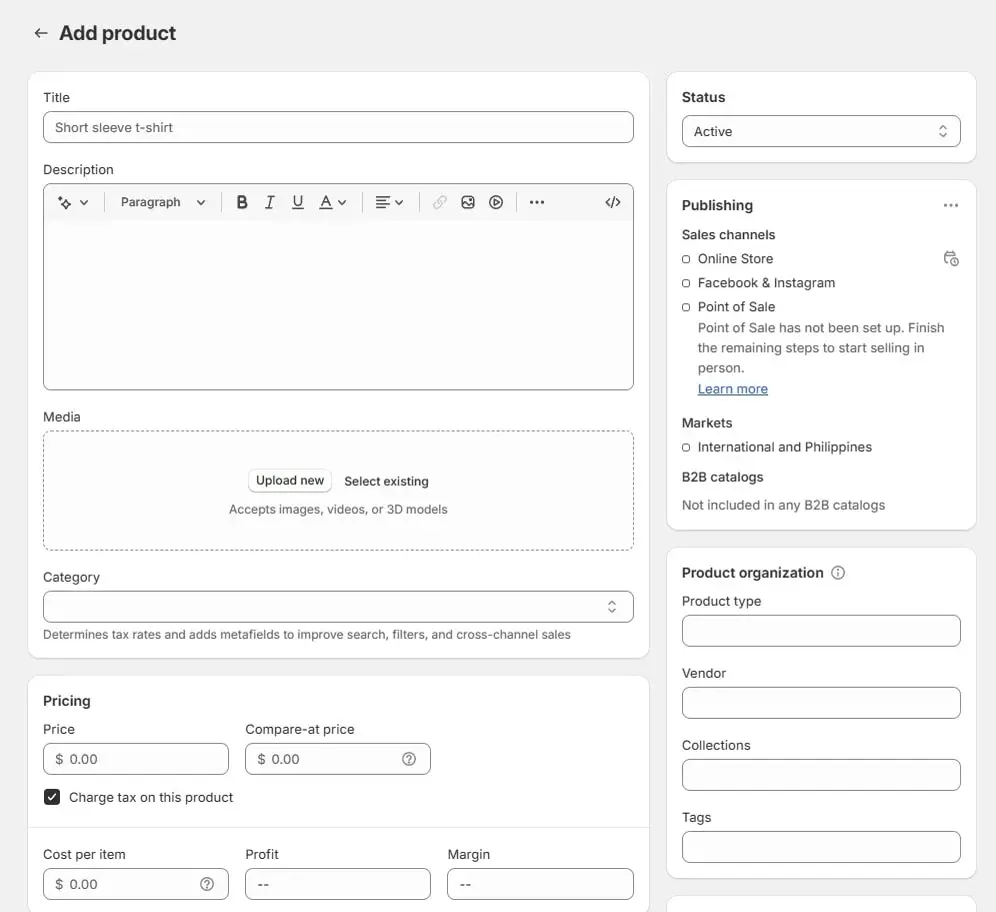
What makes product pages sell in Pakistan:
- Real photos on a model, plus one close-up of the fabric or finish. Shoppers can’t touch the product, so show it.
- A size chart in inches and centimetres. Wrong sizes are the main cause of exchanges.
- Delivery time and COD mentioned right under the price.
- Collections (Men, Women, New arrivals, Sale) so the menu is easy to browse.
Moving from another platform? Shopify’s product CSV import loads hundreds of products at once. Clean the spreadsheet first: one row per variant, same column names as Shopify’s template.
Chapter 07
Step 6: Turn on Cash on Delivery and a Payment Gateway
Shopify Payments isn’t available to stores registered in Pakistan, so you set up payments in two parts.
Cash on delivery: go to Settings → Payments → Manual payment methods → Add manual payment method → Cash on Delivery (COD). Add a short note such as “Pay the rider in cash when your parcel arrives.” Shopify explains the options in Shopify’s guide to manual payment methods.
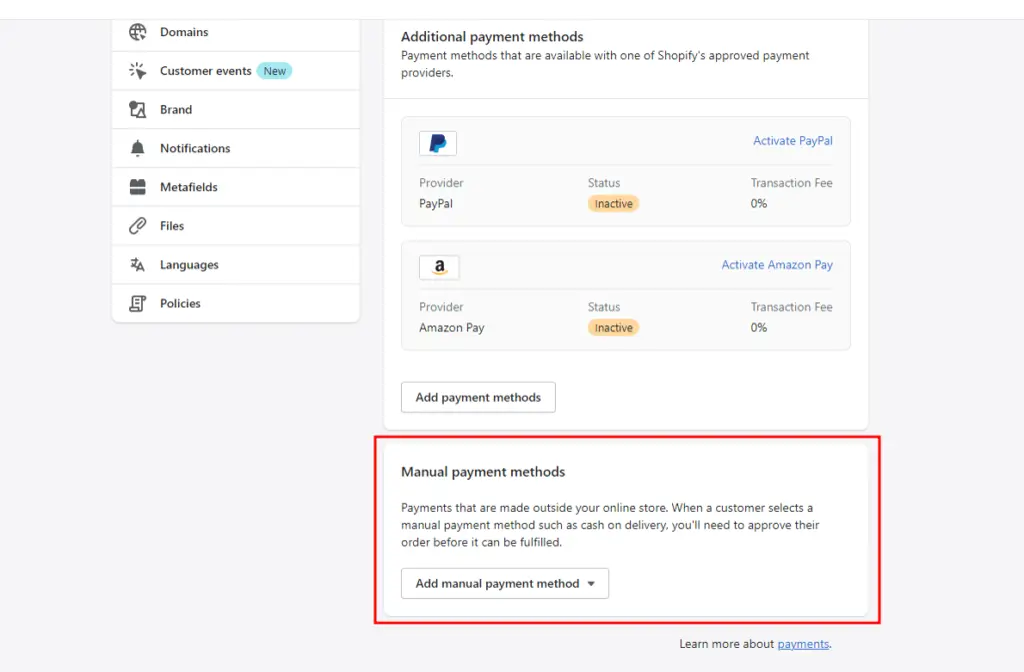
Card and wallet payments: install a Pakistani gateway that works with Shopify, such as PayFast or Safepay, so customers can pay by debit card, credit card, JazzCash or Easypaisa. You’ll need your CNIC, NTN, a business bank account and a live store with policies, so apply once the store is nearly ready. Our payment gateway in Pakistan guide compares the seven options, fees and documents.
Remember that Shopify adds its own transaction fee when you use a third-party gateway instead of Shopify Payments, on top of the gateway’s fee. COD orders don’t pay that fee.
Chapter 08
Step 7: Set Shipping Rates and Connect Your Courier
Go to Settings → Shipping and delivery. Create a shipping zone for Pakistan and add your rates. Most stores use one of three set-ups:
| Rate type | Example | When to use it |
|---|---|---|
| Flat rate | PKR 250 anywhere in Pakistan | Simplest; works for most new stores |
| Free over a minimum | Free over PKR 3,000, otherwise PKR 250 | Raises the average order value |
| By city or weight | Karachi PKR 200, other cities PKR 300 | Heavy or bulky products |
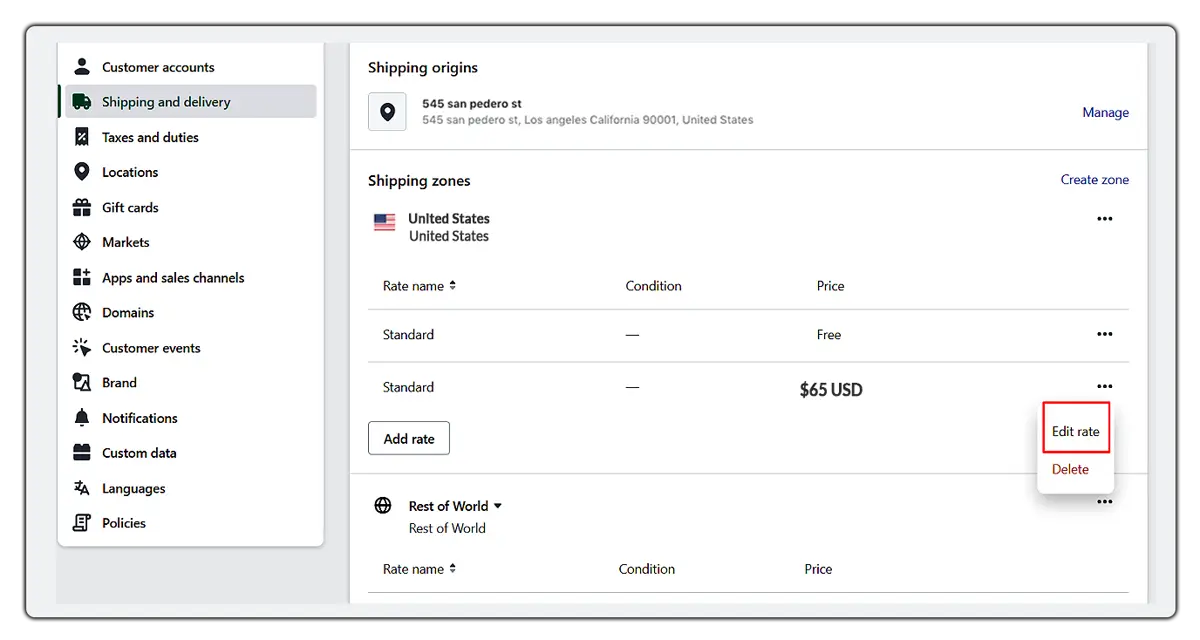
Then connect a courier. Leopards, PostEx, TCS, Trax and M&P all serve online stores, and several have Shopify apps that book parcels and print airway bills straight from your orders. If your courier has no app, export orders and book in its portal. Ask each courier about COD remittance: how soon the cash collected from customers reaches your bank account.
Pro tip: confirm every COD order by WhatsApp or a call before you book the parcel. It catches fake orders and wrong addresses, and it is the cheapest way to cut returns.
Chapter 09
Step 8: Connect Your Own Domain
Your store starts on yourname.myshopify.com. Before launch, add your own domain under Settings → Domains. You can buy one from Shopify, or click Connect existing domain if you already own one from a registrar.
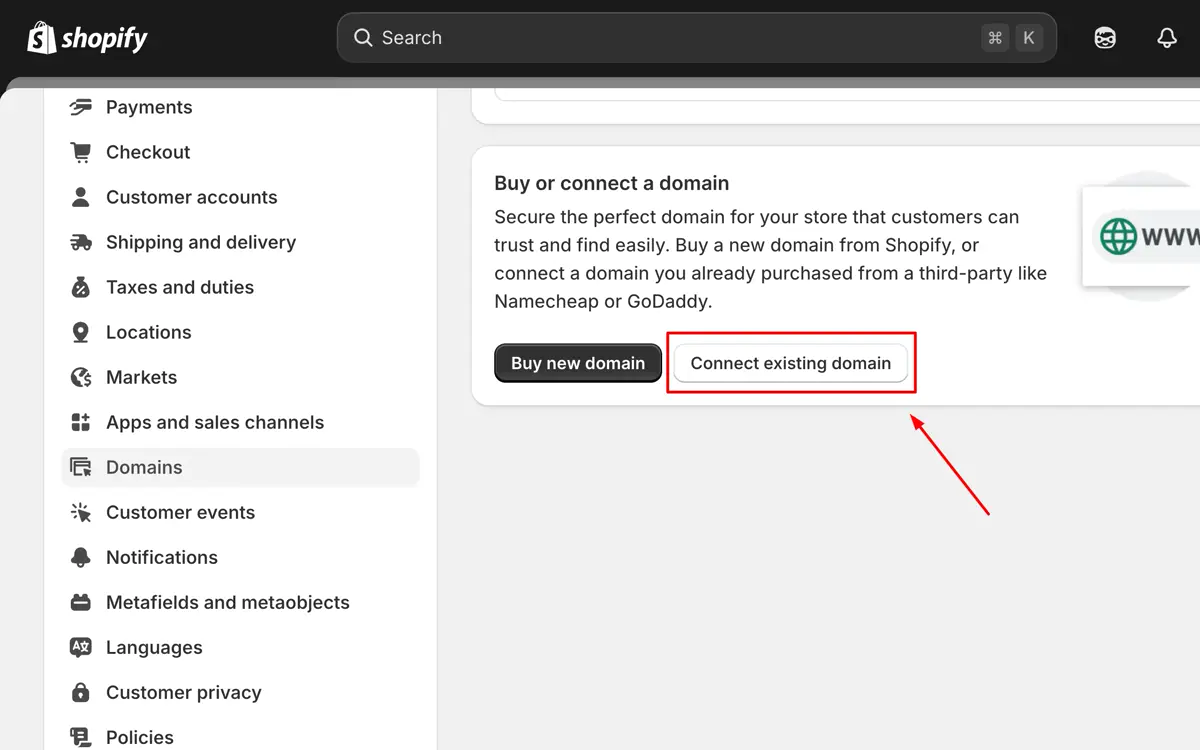
Connecting an existing domain means changing two DNS records at your registrar: an A record for the root domain and a CNAME for www, both pointing to Shopify. Shopify’s guide to connecting a domain lists the exact values. DNS changes can take a few hours to work.
.com or .pk? Both work with Shopify. A .pk domain signals a local brand; you register it through a PKNIC-accredited registrar. If you sell abroad as well, a .com is usually the better choice.
Chapter 10
Step 9: Add Policies, Place Test Orders and Launch
Go to Settings → Policies and add your refund and exchange policy, privacy policy, terms of service, shipping policy and contact information. Shopify can generate templates, but edit them for Pakistan: exchange window, who pays return delivery, and how refunds are made (bank transfer or store credit). Payment gateways check these pages before they approve you.
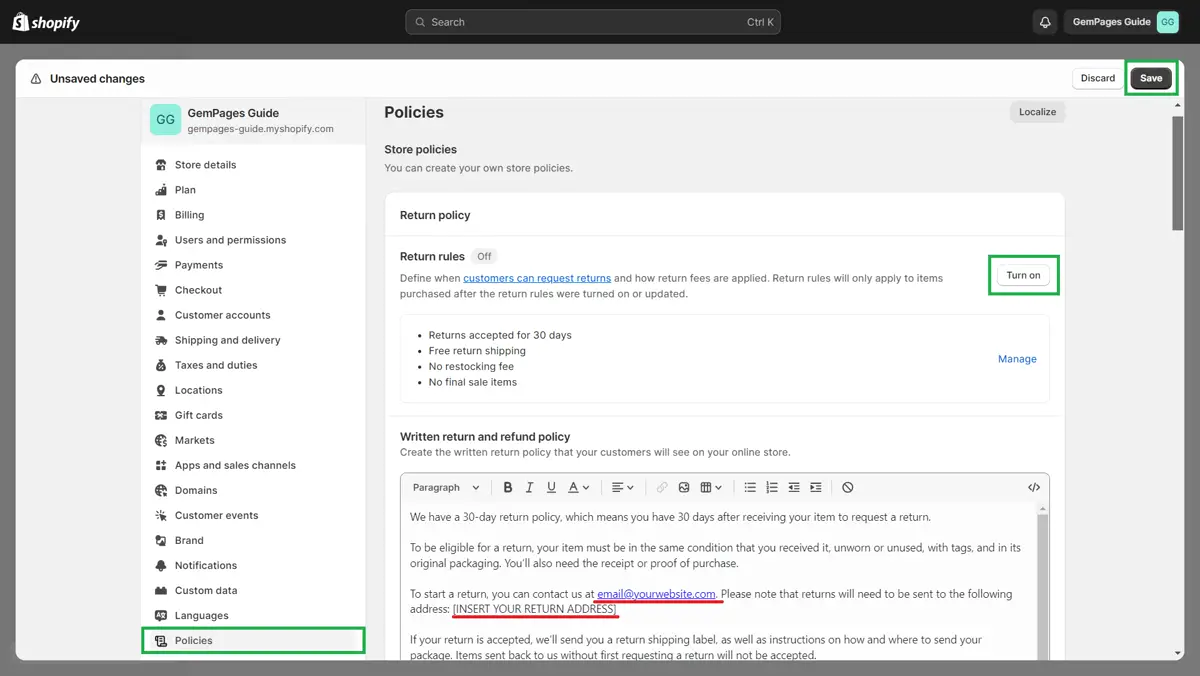
Before you open, place test orders:
- A COD order on your phone, all the way to the thank-you page.
- A card or wallet order once your gateway is live, then refund it.
- Check the order emails, the courier booking and the stock count.
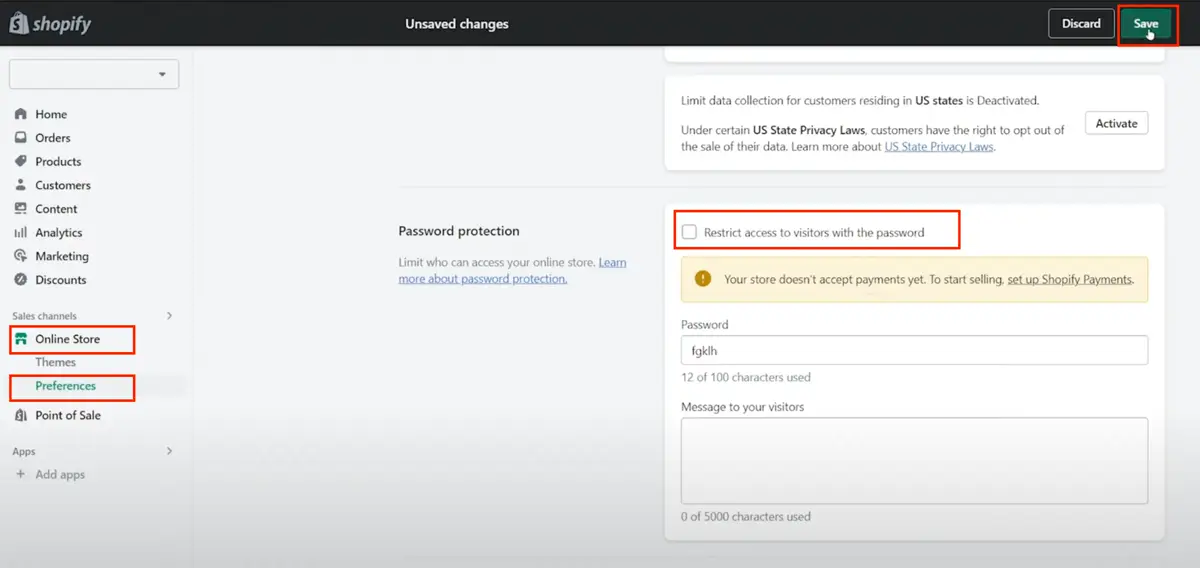
Finally, remove the password. Go to Online Store → Preferences, untick Restrict access to visitors with the password and save. Your store is live.
Chapter 11
What It Costs to Create a Shopify Store in Pakistan
People often ask us for one Shopify store price. There isn’t one, because it depends on your plan, theme and apps. Here is a realistic budget for the first year. Shopify and app prices are in US dollars, so the rupee figure moves with the exchange rate.
| Cost | Typical amount | Notes |
|---|---|---|
| Shopify plan | From US$22/month (Basic, billed yearly) | Starter offer for the first months |
| Domain | Yearly fee | .com or .pk, renewed every year |
| Theme | Free, or a one-off fee for a paid theme | Free themes are enough for most new stores |
| Apps | From free to monthly fees | Install only what you need; each app also slows the store |
| Payment gateway | A percentage per card or wallet payment | Plus Shopify’s extra fee on third-party gateways |
| Courier | Per parcel, plus COD handling | Ask for a written rate card |
If you’d rather not do it yourself, a Shopify store from our team costs PKR 40,000–140,000, depending on your requirements. You still pay the Shopify plan, domain and any paid apps yourself, so the store and accounts stay in your name. Full details are on our website development price page.
Chapter 12
Do It Yourself or Hire a Shopify Developer?
You can follow this guide to create a Shopify store on your own. Many people do, and it is the cheapest way to start. Hiring a team makes sense when your time is better spent on products and marketing, or when you need something the theme editor can’t do.
| Do it yourself | Hire a team | |
|---|---|---|
| Cost | Plan, domain and apps only | Plan and apps, plus a one-off build fee |
| Time | Days to weeks, learning as you go | Usually two to four weeks, done for you |
| Design | Theme as it comes | Custom sections, brand colours and photos |
| Payments and couriers | You apply and connect | Set up and tested for you |
| Speed and SEO | Depends on your choices | Checked before launch |
Not sure Shopify is the right platform at all? Compare it with other options in our guide to the website builder in Pakistan choices, including WordPress and Wix.
Chapter 13
Mistakes We Fix on New Shopify Stores
We take over a lot of Shopify stores that owners started themselves. The same problems come up again and again:
- Store currency left in US dollars, so prices and reports are wrong.
- Too many apps. Ten apps for pop-ups, reviews and timers make the store slow on mobile data. We usually remove half.
- Huge images uploaded straight from the camera, several MB each.
- No phone number required at checkout, so couriers can’t reach the customer.
- Missing policies, which delays payment gateway approval.
- No order confirmation for COD, so fake orders get shipped and returned.
- Product titles like “Item 01” that Google can’t understand. Name products the way buyers search.
Fixing these takes a day or two and often helps sales more than a redesign does. If your Shopify store already has some of them, start with the checkout and image fixes; they affect every order.
FAQ
FAQ
Can I create a Shopify store in Pakistan?
Yes. Anyone in Pakistan can sign up and run a Shopify store. The only limitation is that Shopify Payments isn’t available, so stores use cash on delivery plus a local payment gateway such as PayFast or Safepay.
How much does it cost to create a Shopify store in Pakistan?
Shopify’s Basic plan is US$22 a month billed yearly (US$25 monthly), with a starter offer for the first months. Add a yearly domain, any paid theme or apps, and gateway and courier fees. A store built by Website Services Pakistan costs PKR 40,000–140,000, depending on your requirements.
How do I pay for Shopify from Pakistan?
With a debit or credit card that allows international online payments. Shopify bills in US dollars. If your card is declined, enable online and international transactions in your banking app or ask your bank.
Can I offer cash on delivery on Shopify?
Yes. Add Cash on Delivery under Settings → Payments → Manual payment methods. Most Pakistani Shopify stores offer COD alongside card and wallet payments.
How long does it take to create a Shopify store?
A simple store with a free theme and a few products can be ready in a few days. A branded store with custom sections, a payment gateway and courier integration usually takes two to four weeks.
Do I need a company or NTN to start?
Not to open a Shopify store or take COD orders. A payment gateway for card and wallet payments will ask for your CNIC, NTN and a business bank account.